





I want to save search conditions to use in a search at a later date. Can this be done?
カテゴリ:
5.1. Personal Services
You can check the search history by clicking the [Search History] button at the top of the screen.
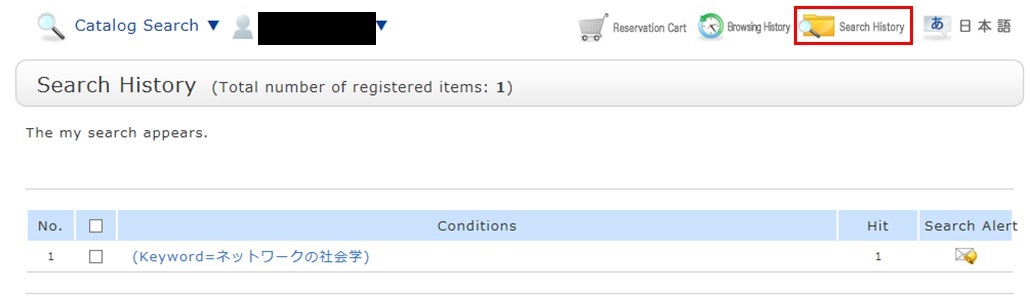
* The screenshot is the screen displayed when "Search History" is clicked.
To save search conditions until a later date by registering them from the search history browsing screen, enter a check mark in the check box of each search condition, and click the [Add to Favorites] button.
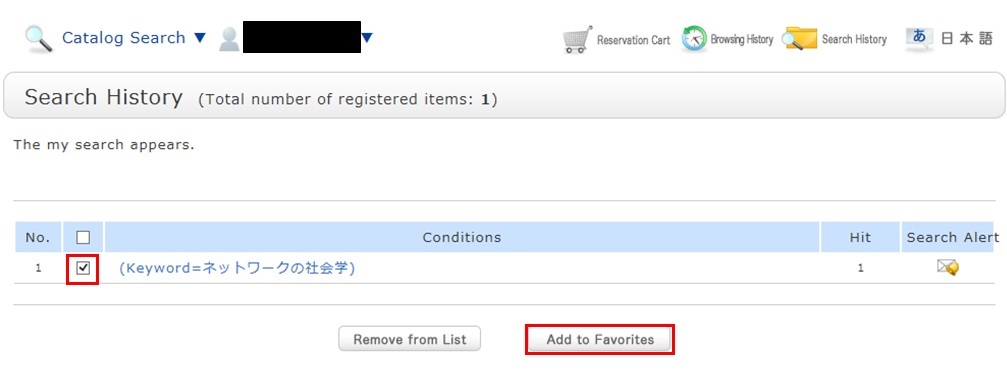
You can check the registered contents from My Search in OPAC.
カレンダー
電子ブック
お役立ちリンク



連絡先
中部大学附属三浦記念図書館
〒487-8501
愛知県春日井市松本町1200
tel:0568-51-4437(直通)
fax:0568-52-1510
mail:chubu-library[at]fsc.chubu.ac.jp
※[at]を@に変更してください。
| 電話受付:平日9:00~17:00 時間外はお問い合わせフォームをご利用ください。※返信にお時間をいただく場合があります。 |